Super Frog Adventure

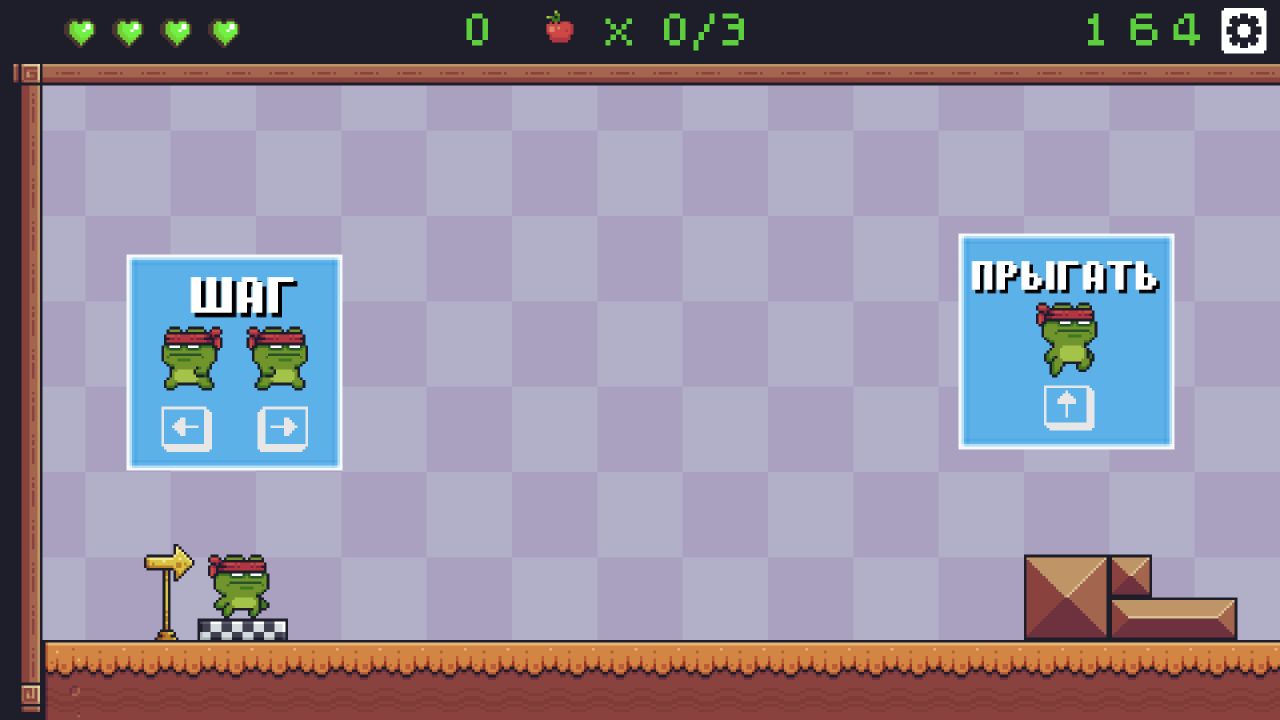
Super Frog Adventure is an eight-level classic platformer with double jumps, enemies, obstacles, and coin collection.

Original editorial guideEditor score 9.8/10

Super Frog Adventure

Super Frog Adventure

Overview

Super Frog Adventure is a compact platformer built around the pleasures that made side-scrolling arcade adventures easy to understand in the first place: move, jump, avoid danger, collect what the level asks for, and reach the finish. The game does not need an elaborate premise. It gives the player a bright world, a small hero, eight levels, obstacles, enemies, and a double jump. That is enough to create a clear platforming test when the level design uses those pieces well.

The important feature is the double jump. A standard jump asks the player to commit from the ground. A double jump gives the player a second decision in the air. That second decision changes the feel of every gap. A player can correct a slightly early jump, extend a leap to reach a collectible, or delay the second press to land more safely after an enemy. The mechanic is friendly to beginners because it forgives small mistakes, but it also gives experienced players room to optimize routes.

Super Frog Adventure has the shape of a classic platformer rather than a modern open-ended adventure. That is a good thing for a browser game. The player can understand the goal immediately, play a level or two during a short break, and leave without needing to remember a complicated quest log. The eight-level structure also gives the game a clear end point. It is not trying to be endless. It is a bite-sized run through platform challenges.

The tone is approachable. Vivid graphics and a familiar platforming setup make the game look suitable for casual play, but the genre still depends on timing. A friendly appearance does not remove the need to read enemy positions, choose when to jump, and resist the urge to chase every collectible without checking the landing. That mix - friendly surface, real timing underneath - is where the game is most useful.

How it plays

The controls are traditional. On desktop, the player moves left and right with the arrow keys or A/D, then jumps with Up or W. On mobile, touch buttons handle movement and jumping. Pressing jump again while airborne triggers the double jump. The level objective includes collecting required items and reaching the end safely.

A typical level asks for several small skills. The player has to judge platform distance, time enemy encounters, decide whether a collectible route is worth the risk, and use the double jump without wasting it. The first jump starts the commitment. The second jump either extends that commitment or fixes it. This gives the game a pleasant rhythm: ground movement, first jump, midair decision, landing, repeat.

Enemies are important because they interrupt the simple jump pattern. A gap with no enemy is a distance problem. A gap with an enemy near the landing is a timing problem. A collectible over that same gap turns it into a risk-reward problem. Super Frog Adventure is strongest when it layers those small questions without making the screen feel unfair.

Collectibles also affect route choice. The source material mentions coins and fruit-style collection goals, so the safest way to think about them is as level collectibles: items that reward exploration and may be required for completion depending on the level. The useful player habit is the same either way. Do not chase a collectible unless you can see the landing and understand the enemy timing around it. A collectible that costs a life or resets a level is rarely worth it on the first attempt.

Because the game is horizontal and supports desktop, Android, and iOS play, it suits several device contexts. Desktop gives the cleanest keyboard control for precise platforming. Mobile makes the game more portable, though touch buttons can feel less exact than physical keys. Platformers are sensitive to input, so players on mobile should expect a slightly more deliberate pace.

Strategy notes

The most important strategy is to delay the double jump until it has a job. Many beginners press jump twice almost immediately because it feels safer. That can work on wide gaps, but it also removes the recovery option. A delayed second jump lets you respond to what actually happens in the air. If the first jump was strong enough, you may not need the second. If the landing shifts from safe to dangerous because of an enemy, the second jump can buy time or change the arc.

The second strategy is to treat enemies as timing markers. In many platformers, enemies are not only threats. They also create rhythm. Watch how an enemy moves before committing to a jump. If it patrols near the landing, wait half a beat. If it sits in the middle of a path, decide whether to jump over it, land before it, or use the double jump to pass cleanly. Rushing enemy timing is a common way to turn an easy level into a frustrating one.

The third strategy is to separate first clears from collectible runs. On a first pass through a level, prioritize survival and learning the layout. Once you understand where the tricky jumps and enemies sit, come back for more complete collection. This reduces frustration because you are not trying to solve every optional route while also learning the basic path.

The fourth strategy is to use short ground adjustments before jumping. A tiny reposition on the platform can be more valuable than a desperate midair correction. If you start a jump from the wrong spot, the double jump may only hide the mistake for a moment. Good platforming begins before the character leaves the ground.

Finally, respect the level count. Eight levels sounds small, but a compact platformer can still ask for sharper timing by the end. Do not assume early-level habits will carry perfectly. As obstacles become denser, the double jump should become more deliberate, not more automatic.

Controls

Left and Right arrows or A and D: Move. Up arrow or W: Jump. Second jump press: Perform a double jump in the air. Touch buttons: Move and jump on mobile. Collect required items before finishing the level when the objective asks for it. Use the double jump as a correction or extension, not as a reflex after every takeoff.

The desktop control layout is familiar and reliable. Arrow keys and WASD support make the game easy to start for players with different keyboard habits. The jump key being available on Up or W is helpful because some players prefer one hand on WASD while others naturally use arrow keys.

Mobile controls are convenient but require patience. Touch buttons can cover part of the screen, and platformers need clear visibility. If you are playing on a phone, keep your thumbs away from the center of the action and avoid tapping the jump button too early. The game is mobile-ready, but precise platforming will always feel a little different on glass than on a keyboard.

Level design and pacing

An eight-level platformer needs to make each level feel purposeful. The first stages should introduce the movement, enemy behavior, and collectible logic. Middle stages should begin combining those ideas. Later stages should ask the player to use the double jump with intention rather than as a panic button.

Super Frog Adventure benefits from not being endless. Endless runners test stamina and reaction over time, but level-based platformers test route understanding. A failed jump teaches a specific section. A second attempt can be cleaner because the player remembers where the enemy sits or where the platform ends. That makes progress feel less random than in many endless games.

The best moments in this kind of game happen when the player sees a route, executes it, and lands exactly where intended. A jump over an enemy into a collectible line, followed by a delayed double jump to the next platform, can feel satisfying even if the level is simple. Platformers do not need enormous systems to feel good. They need readable movement and fair spacing.

Device and accessibility notes

Super Frog Adventure is available for desktop and mobile, which helps its reach. Desktop is the recommended way to play if you care about precision. Keyboard movement gives cleaner start-and-stop control, and the screen usually shows more of the level. Mobile is better for casual access, especially if you only want to play a level or two.

The bright style helps readability, but players should still watch for visual clutter. If collectible routes, enemies, and obstacles are close together, slow down and solve the section piece by piece. Platformers reward rhythm, but rhythm does not mean rushing.

For younger or newer players, the double jump is a useful safety tool. It makes the game more forgiving than a strict one-jump platformer. For experienced players, the same mechanic becomes a way to take cleaner routes and reduce downtime. That dual purpose is why the mechanic works so well here.

Who should play Super Frog Adventure

Super Frog Adventure is a good choice for players who like classic platformers, simple controls, colorful levels, and clear goals. It is especially suitable for someone who wants a complete-feeling browser game rather than an endless score chase. Eight levels give the session a beginning and an end.

It is less ideal for players who dislike timing challenges. Even with a friendly look, jumping games still require patience. It may also feel traditional to players who want unusual mechanics, deep character progression, or open exploration. The game is not trying to surprise with complexity. It is trying to deliver a clean platforming loop.

For a quick recommendation: play it if you want a familiar platform adventure with enough double-jump flexibility to feel forgiving. Skip it if you want slow puzzle planning or a long narrative campaign.

Pros

Straightforward classic-platformer structure. Double jump adds flexibility to level routes. Eight levels provide a clear bite-sized campaign. Desktop and mobile support make it easy to access. Collectibles give players a reason to explore routes, not only run straight to the end. Friendly visuals make the game approachable without removing the timing challenge. The controls are familiar to anyone who has played a side-scrolling platformer.

Tradeoffs

Familiar genre rules may feel traditional. Poor double-jump timing can create harder landings. Touch controls may feel less precise than keyboard input. The eight-level structure is compact, so players wanting a long campaign may finish quickly. Collectible routes can tempt players into risky jumps before they understand the level. The game depends heavily on standard platforming appeal; it will not convert players who dislike jumping challenges.

Controls reference

InputAction
Left and Right arrows or A and DMove.
Up arrow or WJump.
Second jump pressPerform a double jump in the air.
Touch buttonsMove and jump on mobile.

Tips & tricks

The most important strategy is to delay the double jump until it has a job. Many beginners press jump twice almost immediately because it feels safer. That can work on wide gaps, but it also removes the recovery option. A delayed second jump lets you respond to what actually happens in the air. If the first jump was strong enough, you may not need the second. If the landing shifts from safe to dangerous because of an enemy, the second jump can buy time or change the arc. The second strategy is to treat enemies as timing markers. In many platformers, enemies are not only threats. They also create rhythm. Watch how an enemy moves before committing to a jump. If it patrols near the landing, wait half a beat. If it sits in the middle of a path, decide whether to jump over it, land before it, or use the double jump to pass cleanly. Rushing enemy timing is a common way to turn an easy level into a frustrating one. The third strategy is to separate first clears from collectible runs. On a first pass through a level, prioritize survival and learning the layout. Once you understand where the tricky jumps and enemies sit, come back for more complete collection. This reduces frustration because you are not trying to solve every optional route while also learning the basic path. The fourth strategy is to use short ground adjustments before jumping. A tiny reposition on the platform can be more valuable than a desperate midair correction. If you start a jump from the wrong spot, the double jump may only hide the mistake for a moment. Good platforming begins before the character leaves the ground. Finally, respect the level count. Eight levels sounds small, but a compact platformer can still ask for sharper timing by the end. Do not assume early-level habits will carry perfectly. As obstacles become denser, the double jump should become more deliberate, not more automatic.

What we like, what we don't

Pros

  • Straightforward classic-platformer structure.
  • Double jump adds flexibility to level routes.
  • Eight levels provide a clear bite-sized campaign.
  • Desktop and mobile support make it easy to access.
  • Collectibles give players a reason to explore routes, not only run straight to the end.
  • Friendly visuals make the game approachable without removing the timing challenge.
  • The controls are familiar to anyone who has played a side-scrolling platformer.

Cons

  • Familiar genre rules may feel traditional.
  • Poor double-jump timing can create harder landings.
  • Touch controls may feel less precise than keyboard input.
  • The eight-level structure is compact, so players wanting a long campaign may finish quickly.
  • Collectible routes can tempt players into risky jumps before they understand the level.
  • The game depends heavily on standard platforming appeal; it will not convert players who dislike jumping challenges.

Frequently asked

How many levels does Super Frog Adventure have?

The game features eight platforming levels. That gives it a clear bite-sized campaign structure rather than an endless format.

Why is the double jump important?

The double jump gives the character a second decision in the air. It helps with wider gaps, enemy timing, collectible routes, and recovery from imperfect first jumps.

Should I collect everything on the first run?

Not always. On a first pass, it is often better to learn the safe route. Once you understand the level, you can take more risks for collectibles.

Is Super Frog Adventure good on mobile?

Yes, it supports Android and iOS with touch buttons. Desktop still offers more precise control, especially for later levels or tricky double jumps.

What is the biggest beginner mistake?

The biggest mistake is using the double jump too early. Save it until it solves a real problem, such as extending a jump, correcting a landing, or avoiding an enemy.

Categories

Action, Arcade, Adventure

Platform

Desktop + mobile

Devices

For Android, For IOS, For Desktop

Orientation

Landscape

Ragdoll Crash-Test: Throw and Break! — play free in your browser
Moto X3M — play free in your browser
Rooftop Run — play free in your browser
Stickman Archer Kick — play free in your browser
Pool Shoot Tournament — play free in your browser
Wednesday’s Battle: Monster Symphony — play free in your browser
War V: Path of the Survivor! — play free in your browser
Hazmob FPS: Online Shooter — play free in your browser
Labubu Geometry Waves — play free in your browser
Easy Obby Parkour — play free in your browser
Road Crosser — play free in your browser
Battle Hamsters — play free in your browser
Stick Boy: Bazooka Ragdoll — play free in your browser
Plants Vs Steal Brainrots — play free in your browser

Blog

More to read between rounds

Six random blog picks from the editorial desk.
All articles →
Tile Match gameplay preview used as editorial artwork for Top 10 Free Browser Games to Play in 2026

Lists

Top 10 Free Browser Games to Play in 2026

An editor-picked list of the best free browser games available right now, with notes on what makes each one stand out and who it is for.

Apr 22, 20269 min read

Robby The Lava Tsunami gameplay preview used as editorial artwork for Parkour and Platforming in Browser Games

Lists

Parkour and Platforming in Browser Games

The best browser parkour and platforming games turn movement into a readable conversation between timing, route choice, and level design.

Jan 8, 20266 min read

Bark & Blast gameplay preview used as editorial artwork for FPS Fundamentals for Controller and Keyboard

Skill guides

FPS Fundamentals for Controller and Keyboard

Controller and mouse-keyboard ask for different strengths in browser shooters, and both improve when you borrow habits from the other side.

Jan 14, 20266 min read

Shoot & Sprint: Warfare gameplay preview used as editorial artwork for Mastering Aim in Browser Shooter Games

Skill guides

Mastering Aim in Browser Shooter Games

You do not need a paid aim trainer to improve in browser shooters if you use free games with a clear job for each part of the skill.

Mar 15, 20266 min read

Snake 2048 gameplay preview used as editorial artwork for How to Pick the Right .IO Game for Your Mood

Guides

How to Pick the Right .IO Game for Your Mood

The .IO genre has split into half a dozen subgenres. Here is how to pick the right one for the next twenty minutes.

Apr 15, 20267 min read

Stickman Archer Kick gameplay preview used as editorial artwork for Action Games for Short Breaks: Curated Picks

Lists

Action Games for Short Breaks: Curated Picks

An editor-led list of action games designed for the kind of break where you have ten minutes and want to feel something.

Feb 26, 20266 min read