
Gas Station Simulator
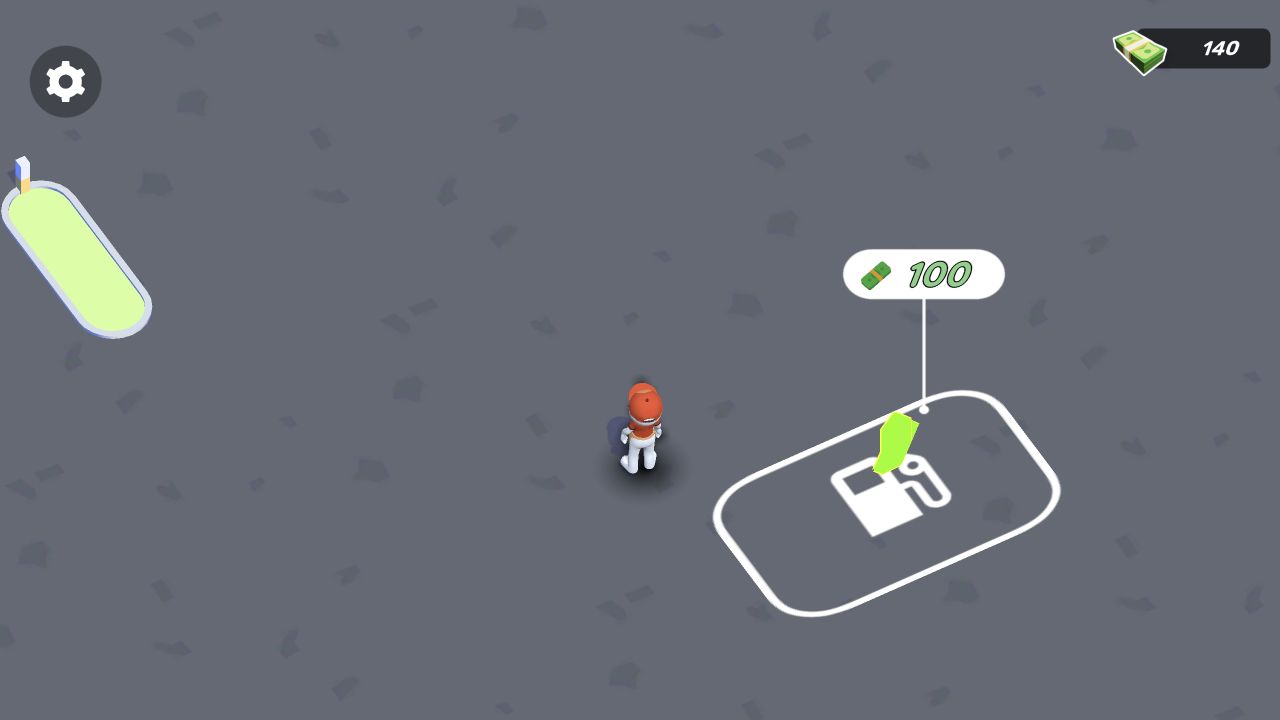
Our session began on a top-down forecourt with 140 cash, a 100-cost first purchase, and a movement lesson that supports both WASD and mouse dragging.
Gas Station Simulator
Hands-on evidence
What we verified in the browser
Tested August 13, 2026 · Desktop (macOS) · Codex in-app Chromium 151.0.7922.76 · 1280×720
Inputs used
- Click Let’s Play
- Focus the scene and press W
Observed result
- The session loaded into a top-down station forecourt.
- The tutorial displayed both WASD and mouse-drag movement.
- Starting cash was 140 and the first marked purchase cost 100.
Scope note: only the observations above are our hands-on findings. Developer, device, release, and broader feature details elsewhere on this page come from the game publisher's catalog metadata unless explicitly labelled as tested.
The first job is movement
Gas Station Simulator did not start with a spreadsheet or upgrade tree. It dropped a worker avatar onto a gray forecourt and placed a translucent movement card over the scene. The card showed WASD above a mouse-drag loop, presenting keyboard and pointer movement as equal options.
We focused the scene and pressed W. The overlay cleared, leaving the avatar visible near a white-outlined purchase pad. The screenshot was taken after that input, so it shows the playable forecourt rather than a promotional image.
Two numbers establish the opening decision
The cash counter in the top-right corner read 140. A green marker next to the first station pad displayed a cost of 100. That means the opening purchase is affordable while still leaving a small balance, although we did not activate it and do not claim what equipment appears afterward.
A slim tank-like meter sat on the left edge. We did not identify its exact resource through play, so the page leaves it unnamed instead of turning appearance into fact.
How to begin without wandering
Clear the movement lesson, then approach the outlined pad before investigating settings. The white border and price callout make it the strongest first objective. On desktop, short WASD presses are easier to observe than holding a key and overshooting a small target.
What remains untested
We did not buy the first station object, serve a car, earn cash, hire staff, or test idle progress. Those ideas may appear in source metadata, but they are not presented here as hands-on findings.
The verified opening is still informative: this is a character-controlled top-down scene, not a click-only dashboard; movement supports keys and pointer gestures; and the first visible economy choice costs 100 against a 140 balance.
Categories
Arcade, Simulation, Idle
Platform
Desktop + mobile
Devices
For Android, For IOS, For Desktop
Orientation
Landscape, Portrait
Blog
More to read between rounds
Six random blog picks from the editorial desk.
Skill guides
Five Board-Reading Mistakes Our Puzzle Openings Make Easy to See
A practical puzzle checklist tied to current screenshots and first-input results.
Industry
From Flash Player to Today’s Browser Stack: A Sourced Timeline
A compact technical history linked to primary documentation and current game-session evidence.
Behind the scenes
How We Review Browser Games: The Evidence Gate Behind Every Public Page
The exact process for moving from a catalog record to a dated, reproducible public game page.
Guides
Casual or Demanding? Choose by the Next Decision, Not a Player Label
A practical way to compare browser-game openings without making psychological claims about players or moods.
Industry
A Verification Rubric for .IO Games We Have Not Yet Approved
The live-lobby, input, latency and persistence evidence required before an .IO title enters the public set.
Lists
Ten Browser-Game Formats, Compared Through Real Opening Sessions
A format-by-format comparison grounded in dated browser sessions, with a clear line between what we observed and what remains untested.