Tile Match
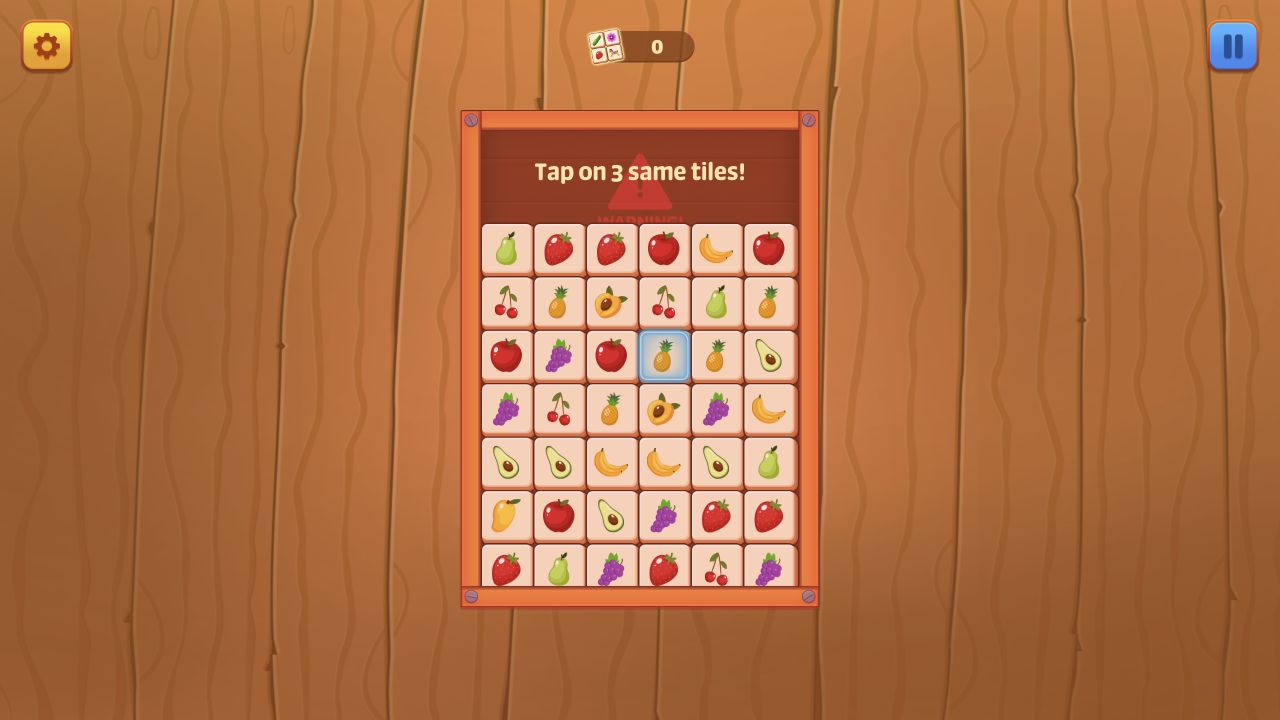
Tile Match is a falling-tile puzzle where players must match pieces before they reach the bottom.
Tile Match
Overview
Tile Match adds time pressure to tile pairing. Tiles descend from the top of the screen, and the player must identify matches quickly enough to clear them before they reach the bottom. It is a puzzle game, but the falling motion gives it arcade urgency.
The strongest runs come from scanning ahead rather than reacting to the lowest tile only.
The official description is direct: tiles keep coming from the top and move down, and the run ends if any tile touches the bottom border. That single rule shapes the whole game. Tile Match is not a relaxed tabletop matching puzzle where the player can study forever. It is a recognition race. The board is always asking whether you can find matches before the danger line closes.
This makes Tile Match a hybrid of puzzle and arcade. The puzzle side is pattern recognition: which tiles match, which group should be cleared, and what board area needs attention. The arcade side is speed: the tiles keep descending, and hesitation creates pressure. A strong player needs both. Fast tapping without recognition creates misclicks. Careful thinking without speed lets the board fall too far.
The game is listed for Android, iOS, and desktop with vertical orientation. That is a natural shape for falling tiles because the danger moves from top to bottom. On phones, the vertical layout should feel comfortable, but the player needs clean touch accuracy. On desktop, mouse input may help with precise selections when speed increases.
How it plays
Watch the falling tiles, match them to clear the board, and score higher by responding quickly. As the pace increases, players need both recognition and calm input.
The basic loop is scan, match, clear, and reset attention. Tiles appear above, move downward, and must be matched before they reach the bottom. The faster you match, the higher your score goes according to the control notes. That scoring rule encourages quick decisions, but the loss condition encourages safe priorities. It is not enough to score quickly in the top half if the lower half is about to fail.
The best way to play is to divide the board into danger zones. The bottom zone is urgent because any tile there can end the level soon. The middle zone is where most planning happens. The top zone gives early information about what pressure is coming next. New players often stare only at the bottom. Better players glance upward while clearing the bottom so they are prepared for the next match.
Matching games become difficult when the player loses rhythm. A single missed match can create a crowded lower board. Then the player rushes, misclicks, and loses more time. Tile Match rewards calm urgency. Move quickly, but do not let speed turn into random tapping.
If the game uses tile colors, symbols, or shapes, exact recognition matters. Similar-looking tiles can be mistaken when the board is moving. Slow down just enough to confirm the match before selecting. A correct match made half a second later is usually better than a wrong tap that wastes the same time and leaves the danger intact.
Strategy notes
Clear tiles that are closest to the bottom first, but keep an eye on large clusters forming above. A quick match near the top can prevent the board from becoming crowded later.
Prioritize the bottom when failure is near. This is the emergency rule. If a tile is close to the bottom, clearing it matters more than chasing a bigger match above. Survival creates the chance to score later.
When the bottom is stable, look for preventive clears in the middle and top. Clearing a group early can stop it from becoming an emergency. This is where high scores come from. Instead of waiting until every tile is dangerous, strong players remove threats before they stack.
Develop a scanning pattern. For example, glance bottom-left to bottom-right, then middle, then top. A consistent scan prevents tunnel vision. Without a pattern, the eye tends to chase the most recent movement and may miss a tile about to touch the bottom.
Avoid double-thinking easy matches. If two matching tiles are clearly safe to clear, take them and move on. Save deeper analysis for crowded sections or ambiguous tiles. Tile Match is partly about allocating attention. Spend attention where it changes the outcome.
Score and survival balance
Speed scoring can tempt players to select every visible match immediately. That can work in early moments, but later boards require triage. A high-value match near the top is not worth losing to a tile at the bottom. The best run balances score ambition with survival discipline.
Think of the bottom line as a debt meter. Every tile that approaches it increases debt. Clearing bottom tiles pays debt. Clearing top tiles is investment. Both are useful, but debt must be paid first. This mental model helps keep decisions clear when the board accelerates.
If the game increases speed over time, use early levels to build rhythm. Do not wait until the pace is intense to learn tile shapes or colors. Early consistency creates a buffer. The more cleanly you clear early, the less clutter you carry into faster moments.
On mobile, finger movement should be economical. Avoid big hand movements that cover the board. Tap with enough precision to avoid misclicks, and keep the screen area below your finger visible when possible. On desktop, mouse movement can be quick, but overshooting targets is still possible when the pace rises.
Editorial assessment
Tile Match should be evaluated on tile readability, touch accuracy, speed curve, scoring feedback, and loss fairness. Tile readability means players can distinguish matches under pressure. Touch accuracy means selections work reliably on mobile. Speed curve means the game becomes harder gradually rather than suddenly. Scoring feedback means faster matches feel rewarded. Loss fairness means the player can see the tile that caused the end and understand the mistake.
The game appears strongest as a short, high-focus puzzle. The rule is simple, the danger is visible, and the scoring pressure is immediate. Its main risk is stress. Players who want calm thinking may find the falling board too tense. Players who enjoy quick recognition puzzles will likely appreciate the clean challenge.
Tile Match is best for players who like fast-paced matching, color or symbol recognition, and short attempts where improvement is easy to feel. It is less ideal for players who prefer unlimited planning time or slow logic puzzles.
Controls
Tap or click tiles: Select matches. Falling board: Clear tiles before they reach the bottom. Speed scoring: Match faster for better results.
Pros
Combines matching with real-time pressure. Easy rule, quick feedback. Good for short puzzle sessions. Vertical layout fits the falling danger line. Speed scoring rewards improved recognition. Simple controls work on desktop and mobile.
Tradeoffs
Later speed can feel intense. Misclicks waste valuable time. Players seeking calm puzzles may find the bottom-line pressure stressful. Small tile differences need clear visuals on phones.
Controls reference
| Input | Action |
|---|---|
Tap or click tiles | Select matches. |
Falling board | Clear tiles before they reach the bottom. |
Speed scoring | Match faster for better results. |
Tips & tricks
Clear tiles that are closest to the bottom first, but keep an eye on large clusters forming above. A quick match near the top can prevent the board from becoming crowded later. Prioritize the bottom when failure is near. This is the emergency rule. If a tile is close to the bottom, clearing it matters more than chasing a bigger match above. Survival creates the chance to score later. When the bottom is stable, look for preventive clears in the middle and top. Clearing a group early can stop it from becoming an emergency. This is where high scores come from. Instead of waiting until every tile is dangerous, strong players remove threats before they stack. Develop a scanning pattern. For example, glance bottom-left to bottom-right, then middle, then top. A consistent scan prevents tunnel vision. Without a pattern, the eye tends to chase the most recent movement and may miss a tile about to touch the bottom. Avoid double-thinking easy matches. If two matching tiles are clearly safe to clear, take them and move on. Save deeper analysis for crowded sections or ambiguous tiles. Tile Match is partly about allocating attention. Spend attention where it changes the outcome.
What we like, what we don't
Pros
- Combines matching with real-time pressure.
- Easy rule, quick feedback.
- Good for short puzzle sessions.
- Vertical layout fits the falling danger line.
- Speed scoring rewards improved recognition.
- Simple controls work on desktop and mobile.
Cons
- Later speed can feel intense.
- Misclicks waste valuable time.
- Players seeking calm puzzles may find the bottom-line pressure stressful.
- Small tile differences need clear visuals on phones.
Frequently asked
What ends a Tile Match run?
The danger is allowing tiles to reach the bottom before they are cleared.
How do you score higher?
Match quickly and keep the lower part of the board under control.
What should beginners prioritize?
Clear the lowest dangerous tiles first. Once the bottom is safe, look upward for matches that prevent future crowding.
Is Tile Match relaxing?
It is easy to understand, but the falling board creates pressure. It is better for players who enjoy quick matching than for players who want slow puzzle planning.
Does it work on mobile?
Yes, it is listed for Android and iOS with vertical orientation. Accurate tapping becomes important as the tiles move faster.
What is the best scanning habit?
Use a consistent scan: check the bottom danger zone, then the middle, then the top for upcoming matches.
Categories
Puzzle, Arcade
Platform
Desktop + mobile
Devices
For Android, For IOS, For Desktop
Orientation
Portrait
Blog
More to read between rounds
Six random blog picks from the editorial desk.
Lists
The Best Merge Games for Relaxing Play
The most soothing merge games turn clutter into order at a pace that feels deliberate rather than sleepy.
Lists
Family-Friendly Free Games for Kids and Parents
A short, vetted list of browser games that are genuinely safe and enjoyable for younger players, with notes for the parents in the room.
Guides
How Tile-Matching Games Quietly Train Your Brain
Tile-matching works as light mental training because it teaches the brain to compress a crowded board into manageable chunks.
Lists
Parkour and Platforming in Browser Games
The best browser parkour and platforming games turn movement into a readable conversation between timing, route choice, and level design.
Skill guides
Mastering Aim in Browser Shooter Games
You do not need a paid aim trainer to improve in browser shooters if you use free games with a clear job for each part of the skill.
Industry
Understanding HTML5 Games vs the Flash Era
A plain-English look at what changed when browser games moved from Flash to HTML5, and what we gained and lost along the way.