Coffee Color Blocks
Coffee Color Blocks is a relaxing color-routing puzzle where players slide shapes to matching gates, fill cups inside each block, and complete the whole figure.
Coffee Color Blocks
Overview
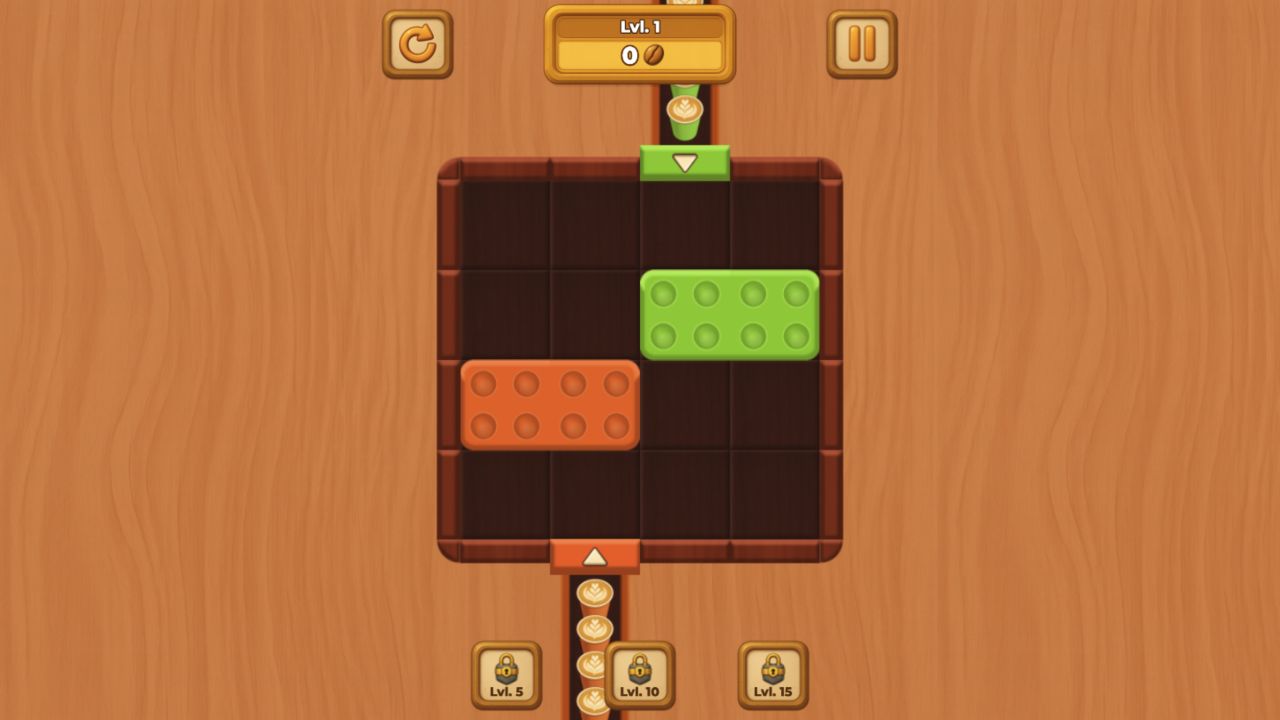
Coffee Color Blocks is a color-routing puzzle with a cozy visual identity and a stricter logic core than the theme first suggests. The player moves colored shapes around a board and guides each one to a gate of the same color. When a block reaches the correct gate, the cups inside that shape fill. The level is complete only when the whole figure has been filled correctly. The cafe-like mood makes the game feel gentle, but the puzzle underneath is about space, order, and avoiding dead ends.
The key word is routing. This is not a match-three game where pieces disappear because three colors touch. It is not a pure sorting game where items simply move into containers. Coffee Color Blocks asks the player to move shapes through space. A block may have the right color, but if the path to its gate is blocked, the match is not useful yet. A shape that looks easy can become a problem if moved too early and parked in the wrong corridor.
That gives the game a pleasant "quiet planning" feel. The controls are simple enough for casual play, and the visual feedback of cups filling gives every correct route a small reward. But the best levels are not solved by tapping randomly. They are solved by noticing which block has limited movement, which shape must clear space for another, and which gate should be approached last.
The game is listed for Android, iOS, and desktop, with vertical orientation. That fits the design well. A vertical board gives the player a natural top-to-bottom reading pattern, and the tap-and-slide input suits mobile. Desktop is comfortable too, but Coffee Color Blocks feels especially at home as a phone-friendly puzzle break.
How it plays
The player taps and slides shapes across the board, trying to bring each colored block to a matching color gate. A block only fills when it reaches the correct gate. A wrong gate does not solve anything, and careless movement can block another shape's path. The level ends when every required section of the figure is filled.
The early boards teach the basic relationship between color and gate. Later boards add more shapes, more colors, and special mechanics. That progression matters because the puzzle would be too simple if every color had a direct route. The more crowded the board becomes, the more the player has to think about sequence.
A good level feels like a small traffic problem. Each shape needs to reach its destination, but not every shape can move first. One block may be trapped behind another. One gate may be easy to reach only after a different piece is moved away. A long route may look inefficient, but it can preserve the one corridor another piece needs. The challenge is not only getting the current block home. It is keeping the board usable after that block moves.
The cup-filling feedback is a nice touch because it gives the puzzle a specific identity. Many color puzzles use abstract gems, balls, or blocks. Here, the filled cups make correct movement feel warmer and more tactile. The game is still a logic puzzle, but the cafe theme softens the experience and makes it more inviting.
Player notes
The best first habit is to identify the least flexible block. If one shape has only one reasonable path, solve or move it early. Flexible blocks can wait because they have backup routes. Rigid blocks become worse if the board changes around them.
The second habit is to look at gates as destinations, not magnets. The nearest matching gate may be correct, but it may also pull a block into a position that blocks another path. Before sliding, ask what the board will look like after the move. If the shape ends in a narrow corridor, will anything else still need that corridor?
The third habit is to preserve empty space. In sliding puzzles, empty cells are not wasted. They are the room that makes movement possible. Filling every open lane too quickly can make the board feel solved for one color and impossible for the rest.
The fourth habit is to pause when a new color or special mechanic appears. The game increases difficulty gradually, so new elements are usually teaching something. Instead of moving immediately, check what the new piece changes. Does it create a shortcut? Does it block a route? Does it force a certain order?
Coffee Color Blocks rewards a calm pace. A player who rushes because the visuals are friendly may create jams. A player who studies the board for a few seconds before moving often solves levels with fewer corrections.
Controls
Tap and slide: Move colored blocks around the board. Color gates: Fill blocks only at matching gates. Level objective: Fill the whole figure with correct matches. Think ahead before sliding a block into a narrow lane. On mobile, keep your finger low enough that it does not hide the gate you are aiming for.
The control scheme is straightforward, which helps the puzzle stay approachable. You are not fighting the interface. The difficulty comes from the board state. That is exactly what a relaxed logic puzzle needs: low input friction and meaningful decisions.
Mobile play should feel natural because the game is vertical and touch-based. A phone can show the board without forcing rotation, and sliding shapes with a finger matches the physical idea of moving blocks around. On desktop, the mouse gives slightly more precision and a larger screen can help with crowded levels.
Color clarity matters. If a board uses similar shades, the player needs enough brightness and contrast to distinguish them. This is not a minor accessibility detail. In a color-routing game, misreading color is not the same as making a strategic mistake; it is a display problem. A comfortable screen makes the puzzle feel fairer.
What makes it satisfying
Coffee Color Blocks is satisfying because it combines three kinds of feedback. First, the player sees a route before moving. Second, the shape slides through the board, confirming or disproving that plan. Third, the cup-filling effect rewards the correct gate. That cycle is small but complete.
The game also benefits from being gentle without being empty. Some relaxing puzzles become too passive because every move is obviously correct. Coffee Color Blocks avoids that by making movement order matter. The board can jam. A player can make a wrong route choice. But the punishment is usually understandable, not chaotic.
The cafe theme is more than decoration when it supports the mood. A coffee-inspired puzzle suggests warmth, routine, and small satisfaction. That fits the pace. This is the kind of game that works best when the player wants a thoughtful pause rather than an adrenaline hit.
Device and session fit
The vertical orientation makes Coffee Color Blocks a strong mobile candidate. It is easy to imagine playing one or two levels while waiting, commuting, or taking a short break. The game does not require audio, fast reactions, or long-term memory. Each board is a compact problem.
Desktop play is still useful for players who prefer a larger board. Later levels with more colors or special mechanics may be easier to parse on a monitor. But unlike many action games, Coffee Color Blocks does not lose its identity on a phone. It may even feel more natural there.
Long sessions depend on level variety. If the game keeps introducing new shapes, color mixes, and mechanics at a steady pace, it can stay engaging. If the boards repeat too much, the relaxing quality may become too quiet. The core mechanic is strong enough for short sessions, and the progression determines how well it holds up over time.
Pros
Color routing is easy to understand. Coffee-cup filling gives satisfying feedback. Relaxed tone suits thoughtful short sessions. Vertical orientation and touch controls fit mobile play. Route planning gives the game more depth than simple color matching. New shapes, colors, and mechanics can keep the puzzle fresh. Mistakes are usually readable as blocked paths or poor order decisions.
Tradeoffs
Later boards may become strict about move order. Color clarity is important for comfortable play. Players wanting action may find the pace quiet. If color shades are too similar on a small screen, mistakes may feel unfair. The relaxing mood may undersell how careful later boards can be. Long-term replay depends on how much variety the level set introduces. Players who dislike sliding-block logic may not be converted by the theme.
Controls reference
| Input | Action |
|---|---|
Tap and slide | Move colored blocks around the board. |
Color gates | Fill blocks only at matching gates. |
Level objective | Fill the whole figure with correct matches. |
Tips & tricks
The best first habit is to identify the least flexible block. If one shape has only one reasonable path, solve or move it early. Flexible blocks can wait because they have backup routes. Rigid blocks become worse if the board changes around them. The second habit is to look at gates as destinations, not magnets. The nearest matching gate may be correct, but it may also pull a block into a position that blocks another path. Before sliding, ask what the board will look like after the move. If the shape ends in a narrow corridor, will anything else still need that corridor? The third habit is to preserve empty space. In sliding puzzles, empty cells are not wasted. They are the room that makes movement possible. Filling every open lane too quickly can make the board feel solved for one color and impossible for the rest. The fourth habit is to pause when a new color or special mechanic appears. The game increases difficulty gradually, so new elements are usually teaching something. Instead of moving immediately, check what the new piece changes. Does it create a shortcut? Does it block a route? Does it force a certain order? Coffee Color Blocks rewards a calm pace. A player who rushes because the visuals are friendly may create jams. A player who studies the board for a few seconds before moving often solves levels with fewer corrections.
What we like, what we don't
Pros
- Color routing is easy to understand.
- Coffee-cup filling gives satisfying feedback.
- Relaxed tone suits thoughtful short sessions.
- Vertical orientation and touch controls fit mobile play.
- Route planning gives the game more depth than simple color matching.
- New shapes, colors, and mechanics can keep the puzzle fresh.
- Mistakes are usually readable as blocked paths or poor order decisions.
Cons
- Later boards may become strict about move order.
- Color clarity is important for comfortable play.
- Players wanting action may find the pace quiet.
- If color shades are too similar on a small screen, mistakes may feel unfair.
- The relaxing mood may undersell how careful later boards can be.
- Long-term replay depends on how much variety the level set introduces.
- Players who dislike sliding-block logic may not be converted by the theme.
Frequently asked
What is the goal?
Move colored shapes to matching gates until every required part of the figure is filled. A block only fills when it reaches the correct color gate.
How do blocks fill?
A block fills when it reaches a gate of the same color. The cup-filling feedback shows that the match has been accepted.
Is order important?
Yes. Order is central. Moving one block too early can block the path another block needs, even if the first move looked correct.
What should beginners do first?
Find the block with the fewest possible routes and solve or move it early. Flexible blocks can usually wait; trapped blocks become harder if the board fills around them.
Is Coffee Color Blocks good on mobile?
Yes. The vertical layout and tap-and-slide controls suit Android and iOS play, though a larger screen helps when levels become crowded.
Categories
Puzzle, Arcade
Platform
Desktop + mobile
Devices
For Android, For IOS, For Desktop
Orientation
Portrait
Blog
More to read between rounds
Six random blog picks from the editorial desk.
Lists
Parkour and Platforming in Browser Games
The best browser parkour and platforming games turn movement into a readable conversation between timing, route choice, and level design.
Guides
Five Common Mistakes New Shooting Game Players Make
If you keep dying in the first five minutes of a shooting game, the cause is usually one of these five mistakes — not a lack of skill.
Industry
Why Browser Games Are Making a Comeback
The browser as a games platform almost died with Flash. A quiet revival across the last few years has changed that completely.
Skill guides
FPS Fundamentals for Controller and Keyboard
Controller and mouse-keyboard ask for different strengths in browser shooters, and both improve when you borrow habits from the other side.
Guides
Progression Systems in Idle Games, Explained
The best idle games are not idle all the way through; they move through active, passive, and reset phases that each ask a different question.
Privacy
How to Play Browser Games Safely (Privacy & Ads Explained)
Browser games are safer than app-store games in many ways, but there are still a few habits worth keeping. Here is a plain-language explainer.