Billiards 3D: Russian Pyramid

Billiards 3D: Russian Pyramid is a realistic billiards game with adjustable virtual opponents, lifelike tables, precise aiming, cue rotation, and strategy practice.

Original editorial guideEditor score 9.3/10

Billiards 3D: Russian Pyramid

Billiards 3D: Russian Pyramid

Overview

Billiards 3D: Russian Pyramid is a sports simulation for players who want a slower, more deliberate browser game. It focuses on realistic billiards rather than arcade trick shots. The player faces virtual opponents, adjusts AI difficulty, plays on lifelike tables, and uses detailed aiming tools to control angle, power, spin, and cue inclination. The Russian Pyramid identity gives the game a more specific character than a generic pool table.

The most important thing to know is that this is a precision game. It is not about clicking quickly. It is not about flashy power. A good shot begins before the cue moves. The player needs to read the table, choose the target ball, imagine where the cue ball will go afterward, and decide whether a simple center-ball hit is enough or whether spin and cue angle are needed.

That makes the game useful for players who enjoy billiards as a thinking sport. A beginner can use easier AI settings and practice basic aiming. A stronger player can raise the opponent difficulty and work on position play. The adjustable AI is valuable because billiards practice is best when the opponent is neither helpless nor impossible. A match that is too easy teaches carelessness. A match that is too hard can make every mistake feel final.

Because the game supports Android, iOS, and desktop, it is widely accessible. Desktop is still the strongest platform for serious precision because keyboard modifiers and mouse control make fine aiming easier. Mobile support is convenient, but realistic billiards asks for careful input, and small screens may make delicate angles harder.

How it plays

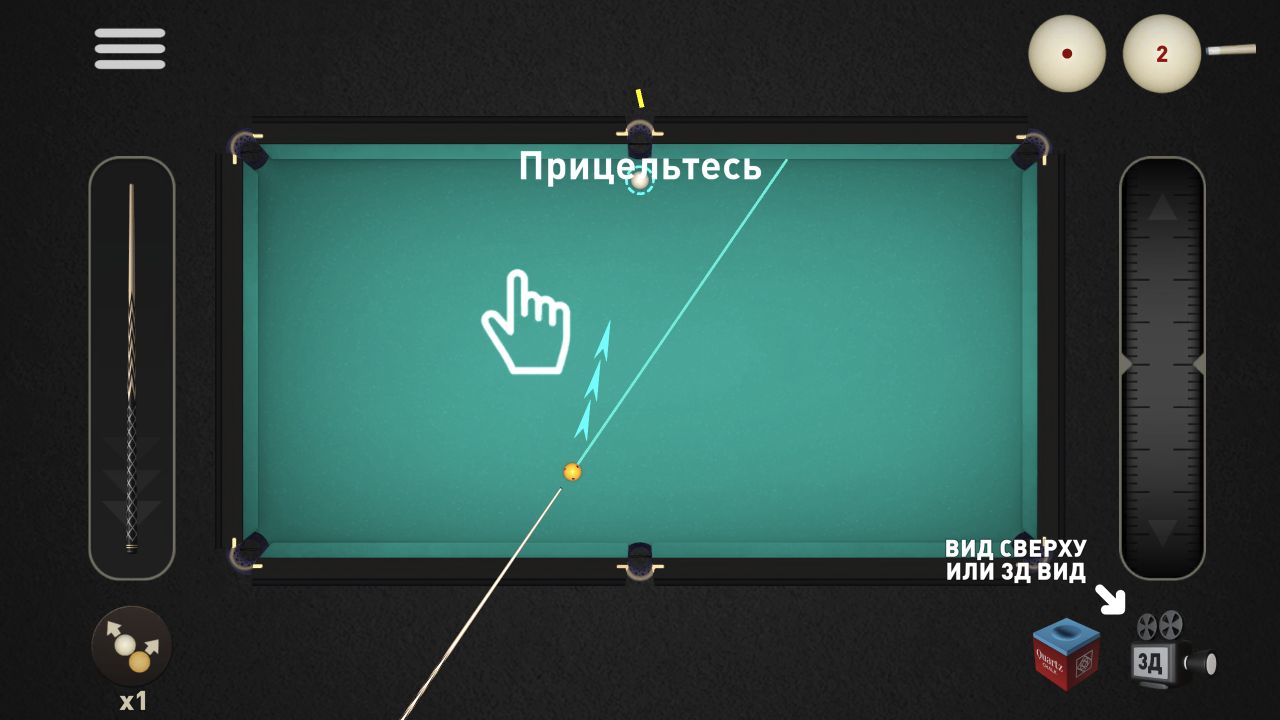
The player begins a shot by clicking anywhere on the table and rotating the cue to aim. For rough shots, direct cue rotation may be enough. For difficult cuts or long-distance attempts, the precision aim wheel on the right side of the screen can fine-tune direction. On PC, holding Shift while aiming provides another way to refine the cue line.

Power is handled through the cue on the left side of the screen. The player clicks the cue, pulls toward the desired force, and releases to strike. That power system encourages measured shots. Too little force may leave the ball short. Too much force can ruin cue-ball position or create an avoidable miss. In billiards, power is not only about reaching the pocket; it is about controlling what happens after contact.

The game also includes impact-point control. The source controls describe selecting the ball icon with a dot, moving the point of impact, and confirming it. On PC, holding X while aiming can move the point of impact. This is the spin or screw element: where the cue strikes the ball changes how the cue ball behaves after contact. That feature gives the game more depth than a simple aim-and-shoot table.

Cue inclination can also be adjusted. The player uses the cue ball icon at the top of the screen, taps or clicks to raise the cue to the desired angle, then confirms the change. On PC, holding Z while aiming can change the cue tilt. This is a more advanced control, and beginners do not need to use it constantly. But its presence matters because it supports more nuanced shot making.

The overall flow is turn-based and thoughtful. Each shot is a small plan. The AI opponent responds, the table changes, and the player reassesses. The game rewards patience more than speed.

Player notes

The first rule is to think beyond the pocket. Beginners often focus only on whether the object ball can be made. Better billiards asks a second question: where will the cue ball stop? A successful pocket that leaves the cue ball trapped can be worse than a safer shot that preserves position.

The second rule is to use the precision tools when the shot deserves them. Rough aim is fine for straight or forgiving angles. Tight cuts, long shots, and position-sensitive attempts deserve the aim wheel or keyboard-assisted fine control. The game provides these tools because small angle changes matter.

The third rule is to avoid overusing power. Hard shots feel decisive, but they also increase error. A controlled medium shot often gives better results because the cue ball remains easier to predict. In a realistic billiards game, restraint is a skill.

The fourth rule is to set AI difficulty near your actual level. If you are learning, a gentler opponent lets you practice without every mistake being punished instantly. If you are comfortable, raising the difficulty makes match play more meaningful. Adjustable opponents are not just a convenience; they are a practice tool.

The fifth rule is to learn spin gradually. Impact-point control is powerful, but it can confuse beginners if used on every shot. Start with center-ball aiming. Add spin when you have a clear reason: stopping the cue ball, changing its path after contact, or escaping a difficult position.

Controls

Table click: Begin aiming. Cue rotation: Aim the shot. Precision wheel: Fine-tune direction. Shift on PC: Fine aim while aiming. Cue pull and release: Set shot power and strike. Ball icon with dot: Adjust impact point for spin or screw behavior. X on PC: Move the point of impact while aiming. Cue ball icon / Z on PC: Change cue inclination.

The controls are more detailed than many browser sports games, and that is a strength for billiards fans. A simple pool game can be fun for two minutes, but it often lacks the tools needed for real position play. Billiards 3D gives the player enough control to treat the table seriously.

There is a learning curve. New players should not try to master every input at once. Start with aim and power. Add precision aim once straight shots feel comfortable. Add spin only when you understand why the cue ball needs a different path. Add cue inclination later, when ordinary shots are no longer enough for the situation.

Desktop has the clearest control advantage because Shift, X, and Z provide efficient modifiers. Mobile play remains possible, but touch input can make very fine adjustment slower. This does not make mobile bad; it simply changes the style. On mobile, play more patiently and avoid rushing delicate shots.

Strategy and table thinking

Russian Pyramid-style billiards rewards patience and table awareness. Even if a player is new to the specific rule set, the core sports logic remains clear: control the cue ball, choose high-percentage shots, and avoid leaving the opponent an easy table.

A strong player thinks in sequences. The current shot should help the next shot. If no clear pocket is available, a defensive or low-risk shot may be smarter than forcing a difficult angle. Against AI opponents, this matters because reckless misses can hand over momentum.

Table size also changes the feel. Larger tables make long shots more demanding and position play more important. Smaller tables may feel more approachable but can also create congestion. The catalog mentions lifelike tables of different sizes, which gives the game room to vary difficulty without changing the basic rules.

The best practice routine is simple: play a few matches against comfortable AI, then raise difficulty only when you can control basic shots. If you miss because of aim, practice precision. If you pocket balls but lose position, practice power. If the cue ball behaves unpredictably after contact, practice impact point and spin.

Who should play Billiards 3D

This is a good game for players who like sports simulations, pool halls, aiming systems, and slow competitive decisions. It is also a good contrast to faster browser games. After a runner or shooter, billiards asks for a completely different kind of attention.

It is less ideal for players who want instant spectacle. The realistic aiming and setup time can feel slow if you prefer constant action. It may also be intimidating for players who have never played billiards before, especially because Russian Pyramid has its own identity. Still, adjustable AI difficulty makes it more approachable than a fixed-difficulty simulation.

If you enjoy games where a single careful action matters, Billiards 3D is worth trying. If you want quick tapping or flashy arcade physics, choose a lighter sports title.

Pros

Adjustable AI difficulty supports learning. Realistic table presentation suits billiards fans. Precision aiming gives control. Power, spin, and cue inclination create real shot variety. Desktop controls support serious fine adjustment. Different table sizes can change the pace of play. Turn-based sports pacing rewards patience and planning.

Tradeoffs

Beginners may need to learn Russian Pyramid expectations. Realistic aiming can feel slow. Mobile precision may vary. Advanced controls can overwhelm players who only want casual pool. Small screens make delicate aiming harder. Overusing spin or power can make shots less predictable. The game is quieter than arcade sports titles.

Controls reference

InputAction
Table clickBegin aiming.
Cue rotationAim the shot.
Precision wheelFine-tune direction.
Shift on PCFine aim while aiming.
Cue pull and releaseSet shot power and strike.
Ball icon with dotAdjust impact point for spin or screw behavior.
X on PCMove the point of impact while aiming.
Cue ball icon / Z on PCChange cue inclination.

Tips & tricks

The first rule is to think beyond the pocket. Beginners often focus only on whether the object ball can be made. Better billiards asks a second question: where will the cue ball stop? A successful pocket that leaves the cue ball trapped can be worse than a safer shot that preserves position. The second rule is to use the precision tools when the shot deserves them. Rough aim is fine for straight or forgiving angles. Tight cuts, long shots, and position-sensitive attempts deserve the aim wheel or keyboard-assisted fine control. The game provides these tools because small angle changes matter. The third rule is to avoid overusing power. Hard shots feel decisive, but they also increase error. A controlled medium shot often gives better results because the cue ball remains easier to predict. In a realistic billiards game, restraint is a skill. The fourth rule is to set AI difficulty near your actual level. If you are learning, a gentler opponent lets you practice without every mistake being punished instantly. If you are comfortable, raising the difficulty makes match play more meaningful. Adjustable opponents are not just a convenience; they are a practice tool. The fifth rule is to learn spin gradually. Impact-point control is powerful, but it can confuse beginners if used on every shot. Start with center-ball aiming. Add spin when you have a clear reason: stopping the cue ball, changing its path after contact, or escaping a difficult position.

What we like, what we don't

Pros

  • Adjustable AI difficulty supports learning.
  • Realistic table presentation suits billiards fans.
  • Precision aiming gives control.
  • Power, spin, and cue inclination create real shot variety.
  • Desktop controls support serious fine adjustment.
  • Different table sizes can change the pace of play.
  • Turn-based sports pacing rewards patience and planning.

Cons

  • Beginners may need to learn Russian Pyramid expectations.
  • Realistic aiming can feel slow.
  • Mobile precision may vary.
  • Advanced controls can overwhelm players who only want casual pool.
  • Small screens make delicate aiming harder.
  • Overusing spin or power can make shots less predictable.
  • The game is quieter than arcade sports titles.

Frequently asked

What kind of billiards is it?

It is built around Russian Pyramid-style billiards, presented as a realistic 3D online billiards game.

Can AI difficulty be changed?

Yes. The catalog mentions virtual opponents with adjustable difficulty, which helps players practice at a comfortable level.

How do you aim?

Click the table, rotate the cue, and use the precision aim wheel for fine adjustment. On PC, Shift can help with precise aiming.

What should beginners practice?

Beginners should practice cue-ball position after the shot. Pocketing a ball is useful, but leaving the cue ball in a playable position is what improves match results.

Is desktop better than mobile?

Desktop is better for precision because it supports mouse control and keyboard modifiers. Mobile works, but very fine aiming may take more patience.

Category

Sports

Platform

Desktop + mobile

Devices

For Android, For IOS, For Desktop

Orientation

Landscape

Golf Invaders — play free in your browser
Sky Ball - Adventure 3D — play free in your browser
Knock Down — play free in your browser
Rolling Balls 3D — play free in your browser
Foot Bomb — play free in your browser
Neon Ball Slope — play free in your browser
Basketball Stars — play free in your browser
Cannon Basket — play free in your browser
Idle Pong — play free in your browser
Soccer Dash — play free in your browser
Golf Orbit — play free in your browser
Ragdoll Soccer — play free in your browser
School Of Basketball — play free in your browser
Ball Bounce: Try It — play free in your browser

Blog

More to read between rounds

Six random blog picks from the editorial desk.

All articles →
Master of 3 Tiles gameplay preview used as editorial artwork for The Best Puzzle Games You Can Finish in 10 Minutes

Lists

The Best Puzzle Games You Can Finish in 10 Minutes

When you have a ten-minute window, these are the puzzle types that fit cleanly into it without leaving you wanting more time.

Mar 25, 20266 min read

TENKYU BALL gameplay preview used as editorial artwork for Top Arcade Games for Quick Reflex Practice

Lists

Top Arcade Games for Quick Reflex Practice

These arcade picks are useful for reflex practice because they give instant feedback without wasting time on setup.

Mar 20, 20266 min read

Stickman Archer Kick gameplay preview used as editorial artwork for Action Games for Short Breaks: Curated Picks

Lists

Action Games for Short Breaks: Curated Picks

An editor-led list of action games designed for the kind of break where you have ten minutes and want to feel something.

Feb 26, 20266 min read

Business Go gameplay preview used as editorial artwork for What Makes a Good .IO Game in 2026

Industry

What Makes a Good .IO Game in 2026

The best .IO games still succeed on three fundamentals: instant entry, painless exit, and a skill gap that players can actually read.

Feb 22, 20266 min read

Robot Unicorn Dash gameplay preview used as editorial artwork for Understanding HTML5 Games vs the Flash Era

Industry

Understanding HTML5 Games vs the Flash Era

A plain-English look at what changed when browser games moved from Flash to HTML5, and what we gained and lost along the way.

Apr 15, 20266 min read

Bark & Blast gameplay preview used as editorial artwork for FPS Fundamentals for Controller and Keyboard

Skill guides

FPS Fundamentals for Controller and Keyboard

Controller and mouse-keyboard ask for different strengths in browser shooters, and both improve when you borrow habits from the other side.

Jan 14, 20266 min read