
Hook Pin Jam
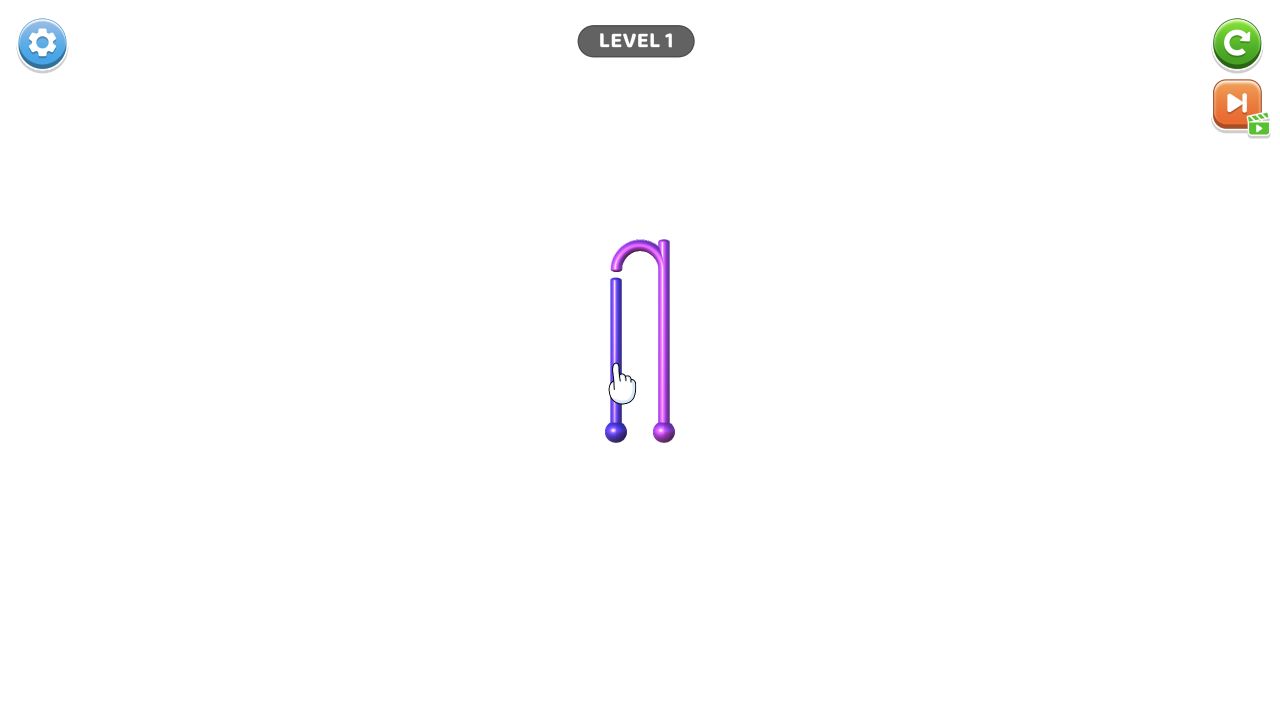
Level 1 is unusually spare: one purple inverted-U hook, one tutorial hand, and no visible board clutter. Our center click did not remove the piece.
Hook Pin Jam
Hands-on evidence
What we verified in the browser
Tested August 13, 2026 · Desktop (macOS) · Codex in-app Chromium 151.0.7922.76 · 1280×720
Inputs used
- Close the preroll
- Click the purple hook near its center
Observed result
- Level 1 used a blank white field with one purple inverted-U hook.
- A tutorial hand pointed to the hook’s left leg.
- The center click produced no visible removal; restart, settings, and rewarded-skip controls remained visible.
Scope note: only the observations above are our hands-on findings. Developer, device, release, and broader feature details elsewhere on this page come from the game publisher's catalog metadata unless explicitly labelled as tested.
A deliberately minimal first level
Hook Pin Jam opened on a white field with a single purple hook shaped like an upside-down U. A hand prompt pointed at the left leg. There were no surrounding blocks, score numbers or timer competing with that instruction.
This makes the opening readable, but it also makes the exact gesture important. We clicked near the hook’s center. The piece did not visibly disappear or detach, and the tutorial remained. That failed input is retained because it narrows the useful advice: a generic center tap is not verified as the solution.
What to try first
Follow the hand placement rather than the geometric center. The prompt sits beside the left leg, suggesting the action begins at a pin or contact point on that side. A drag may be required, or the click target may be narrower than the hook body.
The test did not proceed by spraying random clicks across the canvas. Doing so would make any later state change impossible to attribute to one reproducible input.
Visible interface, separated from inference
Settings and restart controls were present, along with a rewarded skip option. Their presence is verified; their cost, limits and effect are not. No timer was visible during this opening check.
Why the non-result matters
Many generic guides would turn the title into a broad explanation of pulling pins and clearing obstacles. Our actual Level 1 evidence supports a more precise note: the first screen contains one purple hook, the instruction targets its left leg, and a center click alone did not advance it.
We did not complete the level, use the skip, restart the board, or observe later hook arrangements. The screenshot is valuable precisely because it marks the boundary between what loaded and what remains to be tested.
Categories
Puzzle, Strategy
Platform
Desktop + mobile
Devices
For Android, For IOS, For Desktop
Orientation
Portrait
Blog
More to read between rounds
Six random blog picks from the editorial desk.
Guides
What Tile-Matching Games Ask You to Notice
An evidence-led description of board reading and choice, with no claim that playing produces cognitive or medical benefits.
Skill guides
What We Must Verify Before Publishing an FPS Input Guide
A test matrix for mouse, keyboard and controller claims when no current FPS has passed the public evidence gate.
Skill guides
How We Test Movement Before Describing Browser-Game Physics
A method for separating visible motion, control prompts and physics interpretation when a short session cannot prove a full model.
Skill guides
A Four-Week Puzzle Observation Journal—Without Cognitive Claims
A practical way to record recurring board structures while avoiding promises about brain training or transfer.
Guides
Casual or Demanding? Choose by the Next Decision, Not a Player Label
A practical way to compare browser-game openings without making psychological claims about players or moods.
Industry
What Changed After Flash—and What Our Browser Sessions Actually Show
A sourced technical timeline paired with current session evidence, without unsupported claims about market growth or a universal comeback.