Amaze!

Amaze! is a maze-coloring puzzle where players move a ball through every corridor, paint each square, and solve increasingly tricky layouts.

Original editorial guideEditor score 9.9/10

Amaze!

Amaze!

Overview

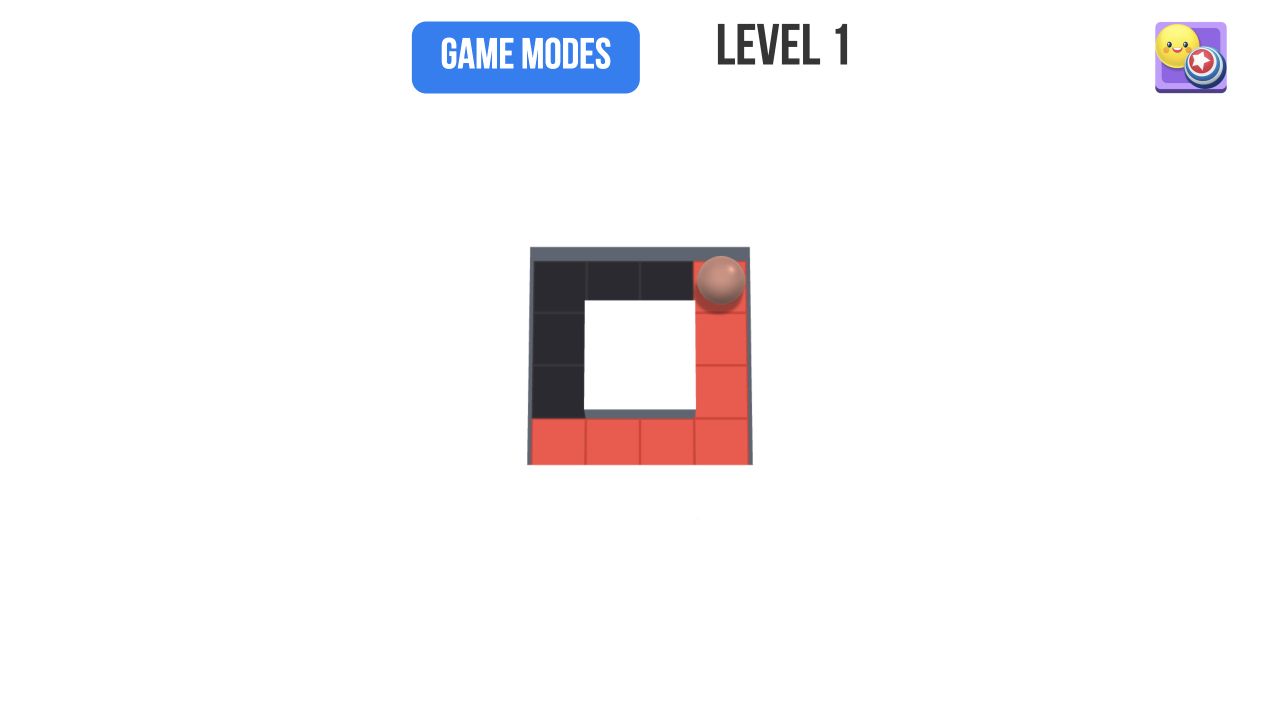
Amaze! is a clean maze puzzle about coloring every square. The player moves a ball through a maze, leaving color behind, and must fill the entire layout to unlock the next level. The simplicity is strong because the board always shows what remains unfinished.

The game belongs in puzzle because route planning matters. If the player moves without thinking, the ball may end in a position that makes the remaining path awkward.

The official description calls each level a canvas, and that is a useful way to think about the game. You are not only reaching an exit. You are painting the maze completely. Every corridor the ball crosses becomes finished, while every uncolored square remains a visible obligation. That makes Amaze! more readable than many maze puzzles. The board tells you exactly what you still owe.

The catch is that readability does not remove planning. A maze can look simple until the last few squares are stranded on the wrong side of the ball. If you rush through the largest open path first, you may leave a side corridor that requires an awkward return. If you clear every tiny branch too early, you may lose the momentum needed to cover the central route cleanly. The best play is about coverage order.

Amaze! has a very high like signal in the catalog, and the appeal is easy to understand. It is colorful, immediate, and satisfying. The ball paints the route as it moves, so every action produces visible progress. At the same time, the later levels can become genuine route puzzles. That combination gives the game enough substance for a real editorial page rather than a thin "move a ball and color squares" summary.

How it plays

Players move the ball through maze corridors until every square has been colored. Later levels become more complex, requiring better path planning and fewer random moves.

The best approach is to identify dead ends first, then plan a route that does not trap the ball too early.

On PC, the game can be controlled with the mouse, keyboard arrows, or WASD. On mobile, the player controls the ball with a finger. That flexibility is useful because the mechanic is simple: choose a direction and the ball travels through the maze, painting as it goes. The challenge is not pressing the right button. The challenge is choosing the right path.

Each level should be read before the first move. Look for dead ends, loops, and long corridors. Dead ends are important because they usually need to be visited at the correct moment. If a dead end can only be entered and exited through one square, you must plan how the ball will return to the main route afterward. Long corridors are important because they can carry the ball far away from unfinished branches. Loops are useful because they offer more than one way to approach remaining squares.

The game gets harder as layouts become more complex. A small maze may allow random movement because every path naturally reconnects. A larger maze may punish randomness by leaving isolated unpainted squares. The difficulty is therefore not about hidden rules. It is about route coverage. The player must paint everything while keeping the ball positioned for the next unfinished section.

The best levels create a satisfying final moment where the last uncolored square is reached naturally. A messy solve may still complete the board, but a clean solve feels deliberate. Amaze! encourages that feeling because the visual feedback is so direct. You can see when the route is elegant and when it is patched together.

Player notes

Paint side corridors before committing to long central paths if they might become hard to reach.

Use the uncolored squares as your guide; they show exactly where the route failed.

The first useful habit is to handle dead ends with intention. If a side corridor has no alternate exit, either clear it before leaving the area or make sure your route will bring you back. Do not pass a dead end casually if the next move sends the ball far across the maze. That is how small leftover squares become annoying.

The second habit is to avoid emotional backtracking. When a square is missed, many players immediately try to return to it, even if that creates a worse position. Pause and inspect the entire board. Sometimes the missed square can be collected later from a cleaner angle. The visible paint trail makes this easier because unfinished areas stand out.

The third habit is to think in regions. Instead of seeing the maze as one tangled shape, divide it into sections: top branch, lower loop, center corridor, side pocket. Clear one region in a way that exits toward the next region. This turns the puzzle into a sequence of small coverage problems rather than a single overwhelming map.

On mobile, finger control feels natural because the game is about sliding a ball through paths. The metadata lists Android, iOS, and desktop support, and both horizontal and vertical orientation. A phone is convenient for quick levels, while desktop can be more comfortable for careful route reading. On any device, the most important visual feature is contrast between painted and unpainted squares. If that contrast is clear, the game remains easy to read even as layouts grow.

Route-planning strategy

Start with the exits from each region. If a section has one entrance and one exit, plan whether you want to enter from the left or right. If a section has only one opening, it is a dead end and should be handled carefully. If a section has several openings, it can be saved for later because it offers more route flexibility.

Try to finish with a path that naturally sweeps through the remaining maze. A common mistake is clearing the center first because it is visually obvious. The center often connects everything, so clearing it too early may strand outer branches. Sometimes the better route is to paint the outer pockets first, then use the center as the final connector.

Do not be afraid to restart a level after learning the shape. Amaze! is not punishing when a puzzle becomes awkward. A restart with better route knowledge can be faster and more satisfying than forcing a messy finish. The game is designed around quick, readable attempts, so restarting is part of the learning process.

If you want cleaner solves, count the number of branch points before moving. A branch point is a square where the route can go more than one way. These are decision points. Choose the direction that clears a less flexible area first. Leave flexible routes for later because they are easier to connect from different positions.

Editorial assessment

Amaze! should be evaluated on maze readability, control response, level progression, and visual feedback. Maze readability means players can understand the layout before moving. Control response means the ball moves in the intended direction without input confusion. Level progression means later puzzles add route complexity without becoming random. Visual feedback means painted and unpainted squares remain clear at all times.

The game appears strongest in clarity. The goal is visible, the controls are simple, and every move leaves a trail. Its main risk is repetition if later levels do not introduce interesting maze shapes. However, the core mechanic is strong enough that even small layout changes can create new route questions. A narrow dead end, a loop, or a long central corridor can change the whole solve.

Amaze! is a good fit for players who like clean puzzle design, coloring feedback, and short levels that become trickier through layout rather than extra rules. It is less ideal for players who want action, enemies, or complex upgrades. The game is quiet, but that quietness is part of its appeal.

Controls

Ball movement: Slide or move through maze paths. Coloring trail: Fill every square the ball crosses. Level completion: Color the whole maze. PC input: Use mouse, arrow keys, or WASD. Mobile input: Control the ball with your finger.

Pros

Clear visual goal makes puzzles readable. Maze layouts create natural difficulty. Coloring feedback is satisfying. Multiple control options support desktop and mobile play. Dead-end planning gives the simple mechanic real depth. Quick levels work well for short sessions.

Tradeoffs

Later mazes can require trial and error. Players wanting action may find it quiet. The mechanic is focused on route planning. Repetition depends on how varied later maze layouts become. Small missed squares can be annoying if the route was planned poorly.

Controls reference

InputAction
Ball movementSlide or move through maze paths.
Coloring trailFill every square the ball crosses.
Level completionColor the whole maze.
PC inputUse mouse, arrow keys, or WASD.
Mobile inputControl the ball with your finger.

Tips & tricks

Paint side corridors before committing to long central paths if they might become hard to reach. Use the uncolored squares as your guide; they show exactly where the route failed. The first useful habit is to handle dead ends with intention. If a side corridor has no alternate exit, either clear it before leaving the area or make sure your route will bring you back. Do not pass a dead end casually if the next move sends the ball far across the maze. That is how small leftover squares become annoying. The second habit is to avoid emotional backtracking. When a square is missed, many players immediately try to return to it, even if that creates a worse position. Pause and inspect the entire board. Sometimes the missed square can be collected later from a cleaner angle. The visible paint trail makes this easier because unfinished areas stand out. The third habit is to think in regions. Instead of seeing the maze as one tangled shape, divide it into sections: top branch, lower loop, center corridor, side pocket. Clear one region in a way that exits toward the next region. This turns the puzzle into a sequence of small coverage problems rather than a single overwhelming map. On mobile, finger control feels natural because the game is about sliding a ball through paths. The metadata lists Android, iOS, and desktop support, and both horizontal and vertical orientation. A phone is convenient for quick levels, while desktop can be more comfortable for careful route reading. On any device, the most important visual feature is contrast between painted and unpainted squares. If that contrast is clear, the game remains easy to read even as layouts grow.

What we like, what we don't

Pros

  • Clear visual goal makes puzzles readable.
  • Maze layouts create natural difficulty.
  • Coloring feedback is satisfying.
  • Multiple control options support desktop and mobile play.
  • Dead-end planning gives the simple mechanic real depth.
  • Quick levels work well for short sessions.

Cons

  • Later mazes can require trial and error.
  • Players wanting action may find it quiet.
  • The mechanic is focused on route planning.
  • Repetition depends on how varied later maze layouts become.
  • Small missed squares can be annoying if the route was planned poorly.

Frequently asked

What is the goal?

Color every square in the maze.

What controls the coloring?

The ball paints squares as it moves.

Why do levels get harder?

Maze layouts become more complex.

What should beginners look for?

Dead ends and paths that may become unreachable.

What controls can I use on PC?

You can use the mouse, keyboard arrows, or WASD to control the ball.

Is Amaze! good on mobile?

Yes. Finger control suits the maze-painting mechanic, and the game is listed for Android and iOS.

What is the best strategy?

Clear restrictive dead ends before committing to long central paths. Keep flexible routes available for later.

Why do I get stuck with one square left?

That usually happens when a side corridor or pocket was skipped earlier. Plan how each region connects before moving too far away.

Category

Puzzle

Platform

Desktop + mobile

Devices

For Android, For IOS, For Desktop

Orientation

Landscape, Portrait

Catch the Bear — play free in your browser
JuicyJong — play free in your browser
Balls: Ricochet! — play free in your browser
Wood Nuts Master: Screw Puzzle — play free in your browser
Hook Pin Jam — play free in your browser
Stickman Archer Kick — play free in your browser
Pool Shoot Tournament — play free in your browser
Wood Blocks Jam — play free in your browser
Tile Match — play free in your browser
Help Tricky Story A Complicated Story — play free in your browser
Balls Animal — play free in your browser
Mindblow — play free in your browser
Coloring by Numbers. Pixel Room — play free in your browser
Bridge Builder — play free in your browser

Blog

More to read between rounds

Six random blog picks from the editorial desk.
All articles →
Amaze! gameplay preview used as editorial artwork for How We Review Browser Games (And What We Look For)

Behind the scenes

How We Review Browser Games (And What We Look For)

A transparent look at the simple, repeatable review process we use before a browser game earns editorial coverage on the site.

Feb 28, 20266 min read

Robby The Lava Tsunami gameplay preview used as editorial artwork for Parkour and Platforming in Browser Games

Lists

Parkour and Platforming in Browser Games

The best browser parkour and platforming games turn movement into a readable conversation between timing, route choice, and level design.

Jan 8, 20266 min read

Wood Nuts Master: Screw Puzzle gameplay preview used as editorial artwork for How to Train Pattern Recognition With Browser Puzzles

Skill guides

How to Train Pattern Recognition With Browser Puzzles

A simple four-week puzzle routine can improve pattern recognition if you treat each session as practice in noticing shape, not just clearing boards.

Feb 8, 20266 min read

Good Sort Master: Triple Match gameplay preview used as editorial artwork for How Tile-Matching Games Quietly Train Your Brain

Guides

How Tile-Matching Games Quietly Train Your Brain

Tile-matching works as light mental training because it teaches the brain to compress a crowded board into manageable chunks.

Mar 26, 20266 min read

2048 3D: Merge Cubes gameplay preview used as editorial artwork for The Best Merge Games for Relaxing Play

Lists

The Best Merge Games for Relaxing Play

The most soothing merge games turn clutter into order at a pace that feels deliberate rather than sleepy.

Apr 8, 20266 min read

Ragdoll Crash-Test: Throw and Break! gameplay preview used as editorial artwork for Why Controls Matter More Than Graphics

Opinion

Why Controls Matter More Than Graphics

Pretty art can attract attention, but poor controls are what make players close the tab for good.

Mar 10, 20266 min read