
JuicyJong
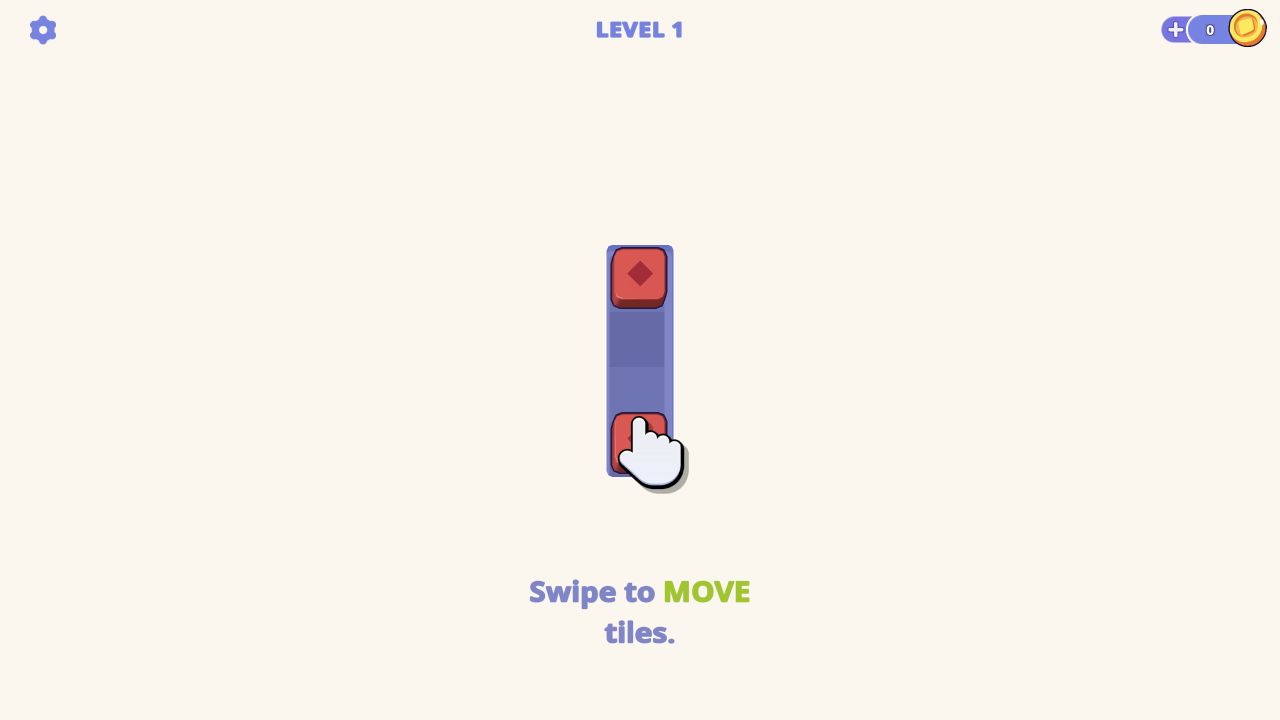
JuicyJong begins with a tiny movement lesson rather than a full Mahjong board: two red diamond tiles sit at opposite ends of a four-cell strip, and the game asks for a swipe.
JuicyJong
Hands-on evidence
What we verified in the browser
Tested August 13, 2026 · Desktop (macOS) · Codex in-app Chromium 151.0.7922.76 · 1280×720
Inputs used
- Close the preroll
- Click the canvas and press ArrowDown
Observed result
- Level 1 opened on a narrow strip with two matching red diamond tiles.
- The tutorial requested a swipe rather than a tap-to-collect action.
- ArrowDown did not substitute for the requested swipe.
Scope note: only the observations above are our hands-on findings. Developer, device, release, and broader feature details elsewhere on this page come from the game publisher's catalog metadata unless explicitly labelled as tested.
The first lesson is spatial, not numerical
Our Level 1 screen was almost empty. A vertical blue strip occupied the center, with a red diamond tile at the top, another at the bottom, and two open cells between them. A hand appeared over the lower tile beside the instruction “Swipe to MOVE tiles.”
That opening corrects an easy assumption. Despite the “jong” name and the publisher's match-three description, the first thing the game teaches is movement across space. You are not initially picking tiles into a tray. You are being shown that a tile can travel along a lane.
Input boundary from our test
We focused the canvas and pressed ArrowDown after the tutorial appeared. The key press did not substitute for a swipe. That negative result is important because the publisher's supplied instructions describe swiping and clicking-and-holding, but do not promise arrow-key movement.
This page therefore does not list keyboard arrows as controls. Desktop players should begin with a pointer drag, and touch players should use the on-screen gesture. We did not claim a successful match or completion because neither occurred in the recorded pass.
How to approach it
Read the lane before moving the lower tile. The two identical red pieces are separated by exactly two cells, so the tutorial is likely teaching a direct merge or adjacency rule with the smallest possible example. The hand sits on the lower piece, making it the intended first subject.
On later boards, the publisher says rows of three or more identical symbols create matches and larger matches can produce bonuses. We did not reach those boards, so those statements remain attributed to the publisher rather than presented as observations.
Why the sparse screen matters
The tutorial does not overwhelm the player with fruit icons, bonuses, and layered pieces. It isolates one gesture and one relationship. That is a good onboarding choice for a movement puzzle because the player can see immediately whether the tile followed the intended direction.
Our screenshot preserves the actual hand prompt, the two matching tiles, the zero-coin state, and the Level 1 label. It also shows why a generic “Mahjong-inspired strategy game” paragraph would miss the useful detail. The first minute is about learning a swipe on a four-cell track.
We stopped at that boundary. No claims here are made about level count, difficulty growth, boosters, or save behavior. The honest recommendation is for players who enjoy learning a rule through a tiny demonstration and are comfortable with swipe-style input inside a browser canvas.
Category
Puzzle
Platform
Desktop + mobile
Devices
For Android, For IOS, For Desktop
Orientation
Landscape, Portrait
Blog
More to read between rounds
Six random blog picks from the editorial desk.
Guides
What Tile-Matching Games Ask You to Notice
An evidence-led description of board reading and choice, with no claim that playing produces cognitive or medical benefits.
Lists
Reading a Merge Board Without Calling It Relaxing
A close look at visible merge information, placement and uncertainty in one documented opening session.
Skill guides
A Four-Week Puzzle Observation Journal—Without Cognitive Claims
A practical way to record recurring board structures while avoiding promises about brain training or transfer.
Industry
From Flash Player to Today’s Browser Stack: A Sourced Timeline
A compact technical history linked to primary documentation and current game-session evidence.
Guides
How to Document a Progression System Before Calling It Deep
A resource-and-unlock checklist grounded in visible opening economies.
Guides
A Beginner’s Guide to Reading Incremental Systems on the First Screen
How to identify resources, costs and feedback without pretending a first session proves an entire idle economy.