Tap 3D Wood Block Away
Tap 3D Wood Block Away is a spatial puzzle game where rotating the model and removing wooden cubes in the right order gradually reveals the hidden 3D structure.
Tap 3D Wood Block Away
Overview
Tap 3D Wood Block Away is a logic puzzle about seeing the object from the right angle. The player rotates a wooden 3D structure, taps blocks, and removes pieces in an order that reveals what is trapped inside the shape. That makes it different from flat block puzzles. The challenge is spatial: a cube may look removable from one side but be blocked by the structure from another.
The wooden visual style gives the game a calm, crafted feeling, while the puzzle logic keeps it from becoming only decorative. It is a good fit for players who enjoy inspecting objects, turning them in their mind, and finding the cleanest removal sequence.
Because it can be played on phone or computer, the game needs intuitive input. Swipe to rotate, tap to remove, and read the model carefully. The rules are accessible, but higher levels can still become dense.
How it plays
The player rotates the 3D block formation to understand which cubes can move away. Tapping in the correct order clears pieces and exposes new choices. If a block is still trapped, the player must change angle or remove surrounding pieces first.
This creates a satisfying layered rhythm. Outer blocks go first, hidden pieces appear, and the final design becomes readable only after careful clearing. The game rewards patience more than speed. A rushed tap may not ruin the level, but it can waste attention and make the structure harder to understand.
Player notes
Rotate before tapping. Many mistakes in 3D block puzzles come from assuming a piece is free when another side is still blocked. Check the direction of the block and the space around it.
Work from the edges inward. Removing obvious outer pieces creates more information and reduces visual clutter. When stuck, turn the object slowly and look for a cube whose path is open.
Spatial Reasoning
Tap 3D Wood Block Away asks players to think in three dimensions. A block may look exposed from the front, but its exit direction may be blocked by a neighboring cube behind it. This is why rotation is not just a camera feature. It is the main thinking tool.
The player should imagine each cube needing a clear path to leave the structure. If that path is blocked, another cube must be removed first. This creates a dependency chain similar to a physical puzzle box. The solution is not random tapping; it is understanding which pieces release other pieces.
The wooden style helps because it makes the blocks feel tangible. The game is strongest when the player can almost feel why a cube cannot move yet.
Removal Order
Working from the outside inward is a reliable beginner strategy, but it is not always enough. Some outer blocks may be distractions, while a side block with a clear direction may unlock an entire face. The better habit is to combine edge clearing with path checking.
When several blocks seem removable, choose the one that reveals the most hidden structure. A move that opens a new layer is often better than a move that only removes a decorative corner. If the level has a move limit or score pressure, this priority becomes even more important.
Players should also rotate after every few removals. The shape changes, and a block that was trapped a moment ago may become free.
Practical Block Advice
Rotate slowly before tapping a crowded area.
Look for blocks with a clearly open exit direction.
Remove outer pieces that reveal new layers first.
Do not keep staring from one angle when stuck.
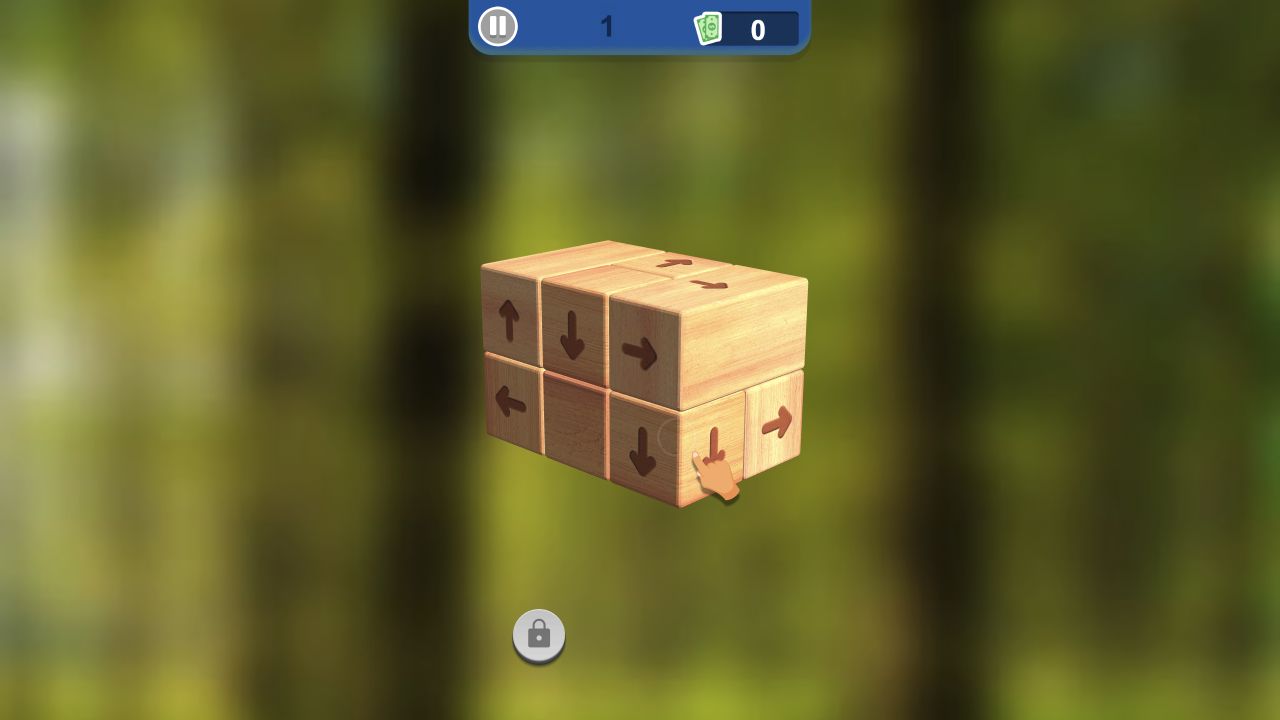
Use the wood grain or block arrows, if shown, to understand movement direction.
Tap carefully on mobile when small cubes sit close together.
After a failed attempt, remember which face was blocked.
Puzzle Pacing
The game should feel thoughtful rather than frantic. Its satisfaction comes from watching a dense object gradually become understandable. Each removed block reduces visual noise and makes the hidden structure clearer.
This pacing makes Tap 3D Wood Block Away a good fit for players who enjoy spatial puzzles but do not want heavy rules. The control scheme is simple, yet the board state can become complex. That contrast is the source of the challenge.
Device Experience
Tap 3D Wood Block Away supports Android, iOS, and desktop, with both horizontal and vertical orientation listed. Touch rotation feels natural because the player can swipe the object directly. Mouse dragging on desktop gives precise control for slow inspection.
The biggest issue on any device is camera readability. The model should rotate smoothly and keep selected blocks visible. On phones, small cubes must remain large enough to tap without hitting the wrong piece. On desktop, the cursor should not hide the block face being inspected.
Screenshot and Preview Standards
A strong preview should show the 3D wooden structure at an angle, with some blocks already removed and hidden layers visible. A flat front-facing screenshot would make the game look like an ordinary block puzzle.
The best image would show depth: outer cubes, inner gaps, and a clear sense that the model can be rotated. That preview communicates the spatial hook immediately.
Editorial Quality Notes
A high-value article should explain rotation, exit paths, removal order, device precision, and the value of camera control. Those details distinguish the game from flat tap puzzles.
The content should help players understand why they are stuck. Usually the answer is not "tap more"; it is "change the angle and find the real blocking piece."
Controls
Swipe / drag: Rotate the 3D wooden structure. Tap / click: Remove a block when its path is clear. Level navigation: Move through increasingly complex puzzle shapes.
Pros
3D rotation gives the puzzle stronger spatial depth than flat matching games. Calm wooden visuals fit thoughtful play. Simple controls make the logic easy to approach.
Tradeoffs
Dense structures may feel confusing from the wrong camera angle. Players who prefer fast puzzles may find the pace too careful. Touch accuracy can matter when small blocks sit close together.
Controls reference
| Input | Action |
|---|---|
Swipe / drag | Rotate the 3D wooden structure. |
Tap / click | Remove a block when its path is clear. |
Level navigation | Move through increasingly complex puzzle shapes. |
Tips & tricks
Rotate before tapping. Many mistakes in 3D block puzzles come from assuming a piece is free when another side is still blocked. Check the direction of the block and the space around it. Work from the edges inward. Removing obvious outer pieces creates more information and reduces visual clutter. When stuck, turn the object slowly and look for a cube whose path is open.
What we like, what we don't
Pros
- 3D rotation gives the puzzle stronger spatial depth than flat matching games.
- Calm wooden visuals fit thoughtful play.
- Simple controls make the logic easy to approach.
Cons
- Dense structures may feel confusing from the wrong camera angle.
- Players who prefer fast puzzles may find the pace too careful.
- Touch accuracy can matter when small blocks sit close together.
Frequently asked
What is the goal in Tap 3D Wood Block Away?
The goal is to rotate the structure and remove wooden blocks in a valid order until the design is cleared or revealed.
Is it a timing game?
No. It is mainly about logic, spatial awareness, and choosing the right removal sequence.
What should I do when stuck?
Rotate the model slowly and search for an outer block with a clear exit path.
Can it be played on desktop and mobile?
Yes. The catalog describes phone and computer play with swipe, rotate, and tap-style controls.
What is the biggest beginner mistake?
Tapping from one angle without checking whether the block's exit path is actually clear.
Why rotate after removals?
Each removed block changes the structure and may reveal new valid moves.
Category
Puzzle
Platform
Desktop + mobile
Devices
For Android, For IOS, For Desktop
Orientation
Landscape, Portrait
Blog
More to read between rounds
Six random blog picks from the editorial desk.
Opinion
When to Quit a Running Game (And When to Stick)
Endless runners are best when they create one more try energy, not when they turn small failure into quiet obligation.
Lists
Family-Friendly Free Games for Kids and Parents
A short, vetted list of browser games that are genuinely safe and enjoyable for younger players, with notes for the parents in the room.
Guides
A Beginner's Guide to Idle and Clicker Games
Clickers look like single-button games but they are actually a serious genre with deep design conventions. Here is how to get started.
Privacy
How to Play Browser Games Safely (Privacy & Ads Explained)
Browser games are safer than app-store games in many ways, but there are still a few habits worth keeping. Here is a plain-language explainer.
Lists
Action Games for Short Breaks: Curated Picks
An editor-led list of action games designed for the kind of break where you have ten minutes and want to feel something.
Guides
Five Common Mistakes New Shooting Game Players Make
If you keep dying in the first five minutes of a shooting game, the cause is usually one of these five mistakes — not a lack of skill.